
Quick Answer
Most AI meeting notetakers are built for video calls. They require a bot to join a Zoom or Google Meet session, which means they are completely useless the moment you walk into a conference room.
The tools that actually work for in-person meetings follow a different model: record on your phone or a dedicated device, then upload the audio file for AI processing.
KenzNote is built exactly for this workflow: record on your phone, upload the file, get a full transcript and AI summary for $0.99. No bot, no video call, no calendar access required.
Key Takeaways
- Most AI meeting tools only work on video calls because they rely on a bot joining Zoom, Google Meet, or Teams as a participant
- In-person meetings require a different approach: record on your phone or a dedicated device, then upload the audio file for AI processing
- Your smartphone is the most practical recording device for most in-person meetings when placed centrally on the table
- KenzNote is built for the upload workflow at $0.99 per meeting with no subscription, no bot, and no calendar connection
- Audio quality is the single biggest factor in transcription accuracy for in-person recordings
- Dedicated hardware recorders like the Zoom H1n or Plaud Note offer better audio quality in larger rooms but add cost
- Local Whisper-based tools provide maximum privacy for regulated industries where audio cannot leave your device
Table of Contents
- The Problem with Most AI Meeting Tools
- How AI Note-Taking for In-Person Meetings Works
- What to Look for in an In-Person AI Notetaker
- Top AI Note Takers for In-Person Meetings
- Tool Comparison Table
- Device Options for Recording In-Person Meetings
- Tips for Best In-Person Recording Quality
- Frequently Asked Questions
- Related Resources
You searched "AI note taker for in-person meetings" because you walked out of a conference room, a client visit, or a workshop and realized that none of the popular AI meeting tools work when there is no Zoom link. You are right. Most of them don't.
The vast majority of AI notetakers on the market are designed for one specific use case: a scheduled video call with a bot joining as a participant. That workflow falls apart entirely when your meeting happens face to face.
This guide covers what actually works for in-person meetings in 2026, from phone-based recording to dedicated hardware, with honest assessments of each option.
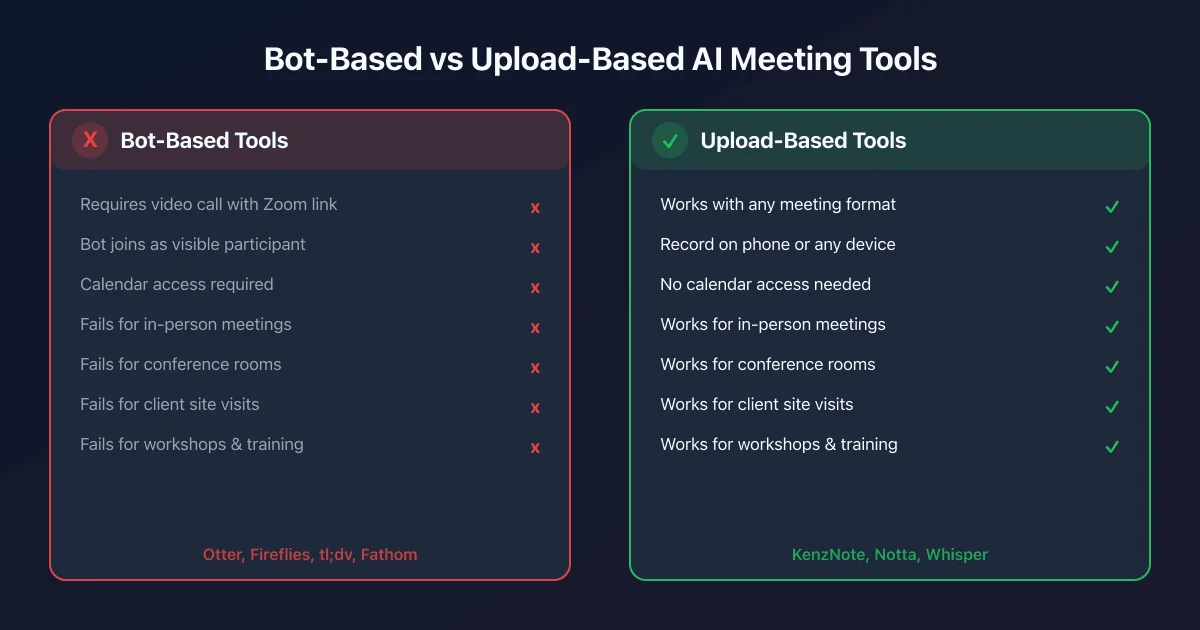 Most AI meeting tools require a bot on a video call. In-person meetings need a different approach.
The Problem with Most AI Meeting Tools
The vast majority of AI meeting notetakers on the market, Otter.ai, Fireflies, tl;dv, Fathom, are designed around one specific use case: a scheduled video call with a bot joining as a participant. You connect your Google Calendar or Outlook, the tool sees your upcoming Zoom meeting, and when the call starts, a bot account appears in the participant list and records everything.
That workflow falls apart entirely when your meeting is not a video call.
Board meetings in a conference room. Client visits at your office. Sales pitches at a prospect's location. Workshops and training sessions. Interviews. One-on-ones that happen face to face. All of these produce valuable conversation that needs to be documented, but none of them have a Zoom link for a bot to join.
This is not a niche problem. A significant portion of professional meetings still happen in person. Hybrid work environments mean that some participants are physically present while others dial in remotely. Field teams, sales reps, consultants, and executives spend substantial parts of their week in rooms rather than in front of cameras.
The AI meeting note industry has largely overlooked this use case. The tools designed for it either require specialized hardware, charge premium prices, or deliver transcription quality that falls short of what modern AI can produce.
That is changing, and this article covers what actually works in 2026.
How AI Note-Taking for In-Person Meetings Works
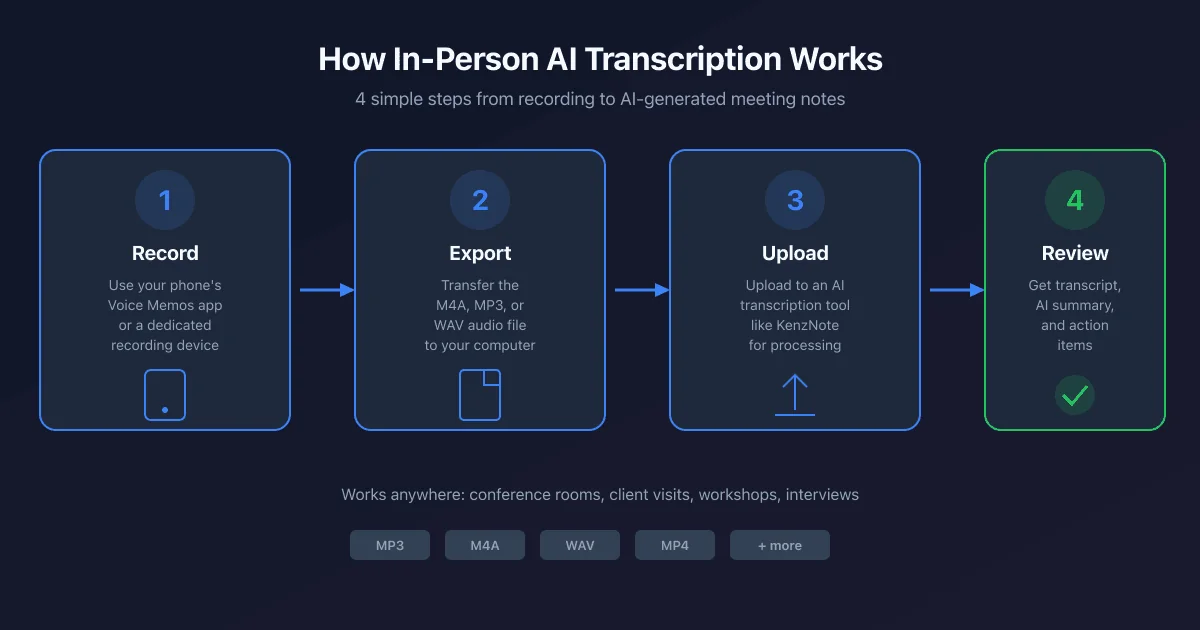 The in-person AI transcription workflow: record, export, upload, review.
Unlike bot-based tools that tap into video platform APIs, in-person AI transcription follows a simpler, more flexible model:
Step 1: Record the meeting audio. Use your smartphone's native voice memo app, a dedicated recording app, or a hardware recorder like a Plaud Note or Zoom H1n. Place your device in the center of the table or near the primary speaker for best results.
Step 2: Export or transfer the audio file. Most phones save recordings as M4A or MP3 files. Dedicated recorders typically output WAV or MP3. You transfer the file to your computer or directly to the upload tool.
Step 3: Upload to an AI transcription tool. Services like KenzNote accept audio and video file uploads. The AI processes the recording, transcribes every word, identifies different speakers, generates a structured summary, and extracts action items.
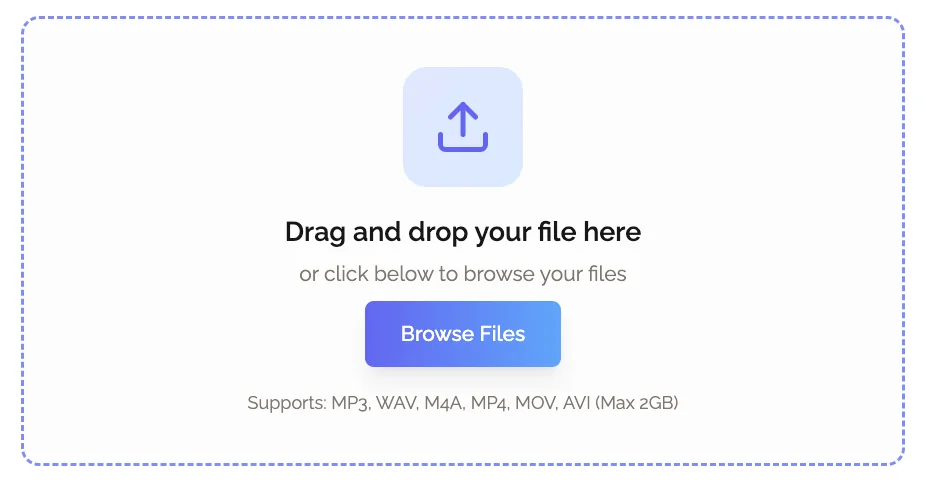 Upload your in-person meeting recording to KenzNote for AI processing. No bot, no calendar access.
Step 4: Review and share your notes. You receive a clean transcript alongside an AI-generated summary, typically within a few minutes for a standard one-hour recording.
The result is identical in quality to what you would get from a bot-based tool on a video call. The difference is that it works anywhere, with any participants, regardless of whether anyone is on a screen.
What to Look for in an In-Person AI Notetaker
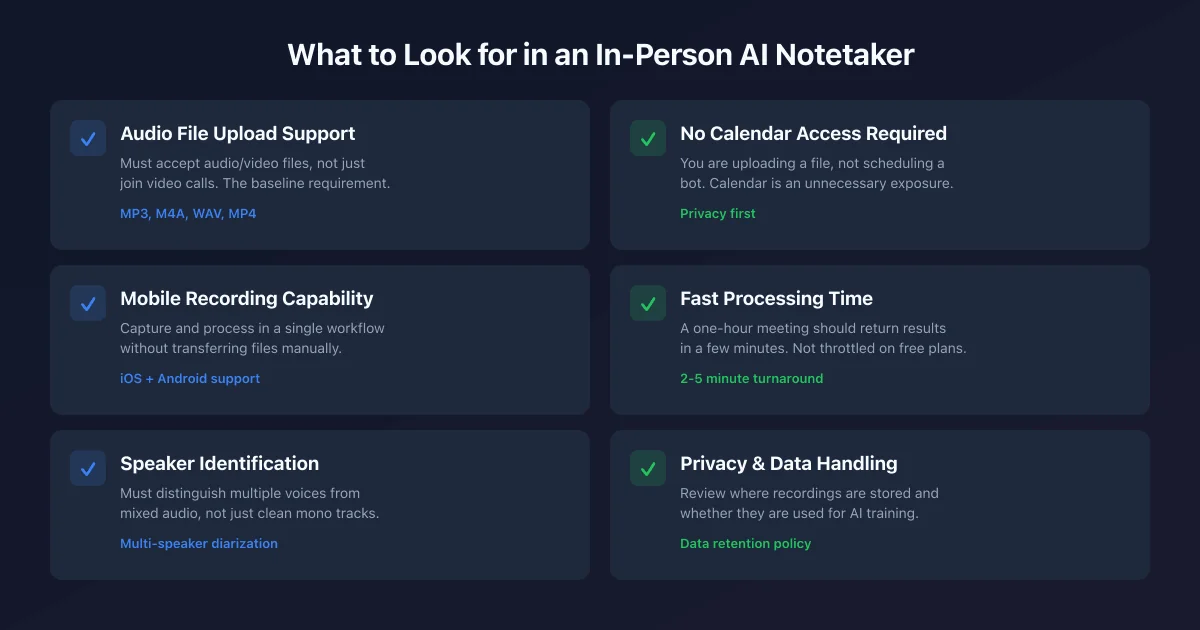 Key features to evaluate when choosing an AI notetaker for in-person meetings.
Not every transcription tool handles in-person recording equally well. Here is what matters when you are evaluating options for physical meetings:
Audio file upload support. This is the baseline requirement. The tool must accept audio or video files, not just join video calls. Many popular AI notetakers do not support file uploads at all on their free plans, or restrict uploads to short durations.
Mobile recording capability. If the tool has a mobile app with built-in recording, you can capture and process in a single workflow without transferring files. This matters for field teams and anyone who does not want to manage audio files manually.
Speaker identification accuracy. In-person meetings often involve multiple voices around a table, without the neat separation that individual microphones provide in video calls. The AI needs to be good at distinguishing speakers from mixed audio, not just clean mono tracks.
No calendar access required. In-person meeting tools should not need to see your calendar. You are not scheduling a bot. You are uploading a file. Any requirement to connect your calendar is a privacy trade-off that is completely unnecessary for this use case.
Reasonable per-file processing time. A one-hour meeting should return results in a few minutes. Some tools throttle processing speed on lower-tier plans, which becomes frustrating when you need notes before your next meeting.
Privacy and data handling. Your audio file contains sensitive business conversations. Review where recordings are stored, whether they are used for AI training, and how long they are retained.
Top AI Note Takers for In-Person Meetings
1. KenzNote - Best for Upload-Based In-Person Recording
The honest summary: KenzNote is built around the upload model, which makes it the most natural fit for in-person meetings. You record on your phone, upload the file, and get back a full transcript and AI-generated meeting notes. No bot, no calendar connection, no subscription required.
How it works for in-person meetings:
- Record your meeting using your phone's built-in voice memo app or any recording app
- Upload the audio or video file directly to KenzNote
- Receive a full transcript with speaker labels, AI summary, and action items
- Download or share as needed
Pricing: $0.99 per meeting. You pay only when you process a recording, with no monthly subscription.
What you get per upload:
- Full meeting transcription with speaker identification
- AI-generated summary and key takeaways
- Action items automatically extracted
- No expiration on stored transcripts
File formats supported: Audio and video files including MP3, M4A, WAV, MP4
Privacy: No calendar access required. You control exactly which recordings you process.
Who it is right for: Anyone with occasional to regular in-person meetings who wants clean AI notes without committing to a monthly subscription. Freelancers, consultants, sales professionals, and team leads who mix remote and in-person work will find the pay-per-use model matches how they actually meet.
Who it is not right for: Teams with very high meeting volume (20+ hours per month of recordings) where a subscription tool might become cheaper per meeting.
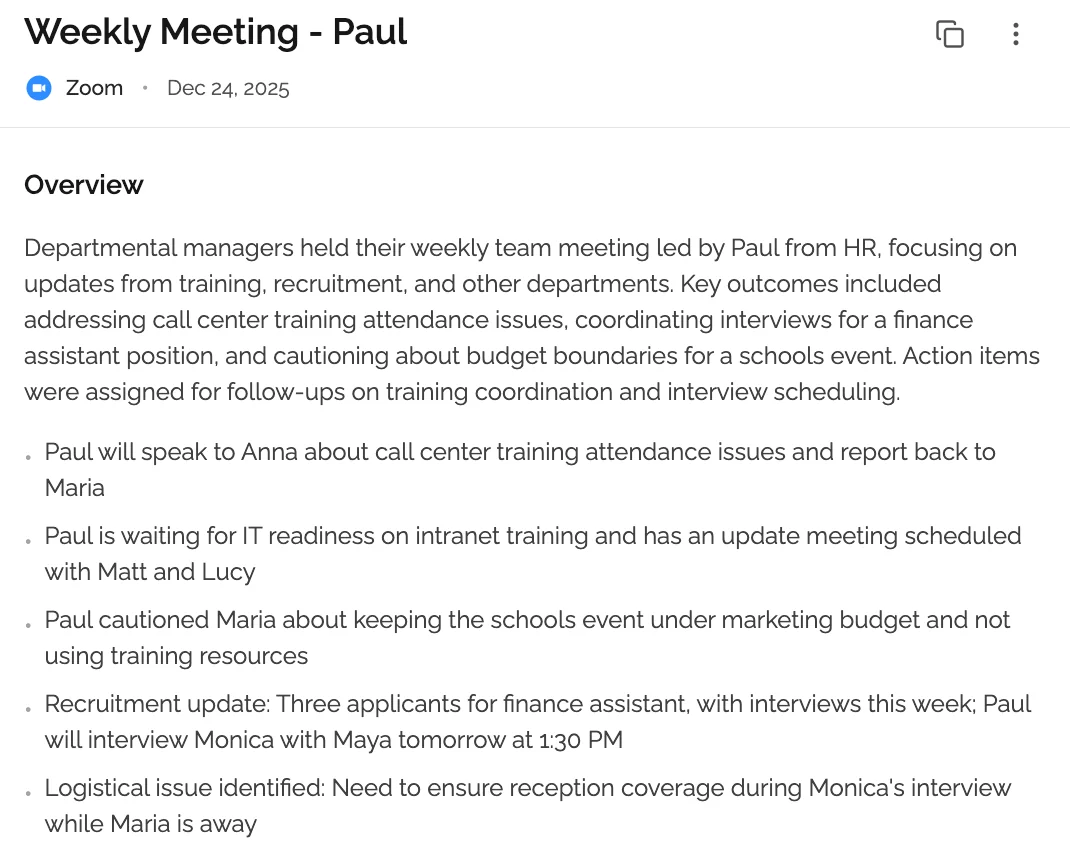 KenzNote delivers AI summaries, action items, and full transcripts from your uploaded in-person recording.
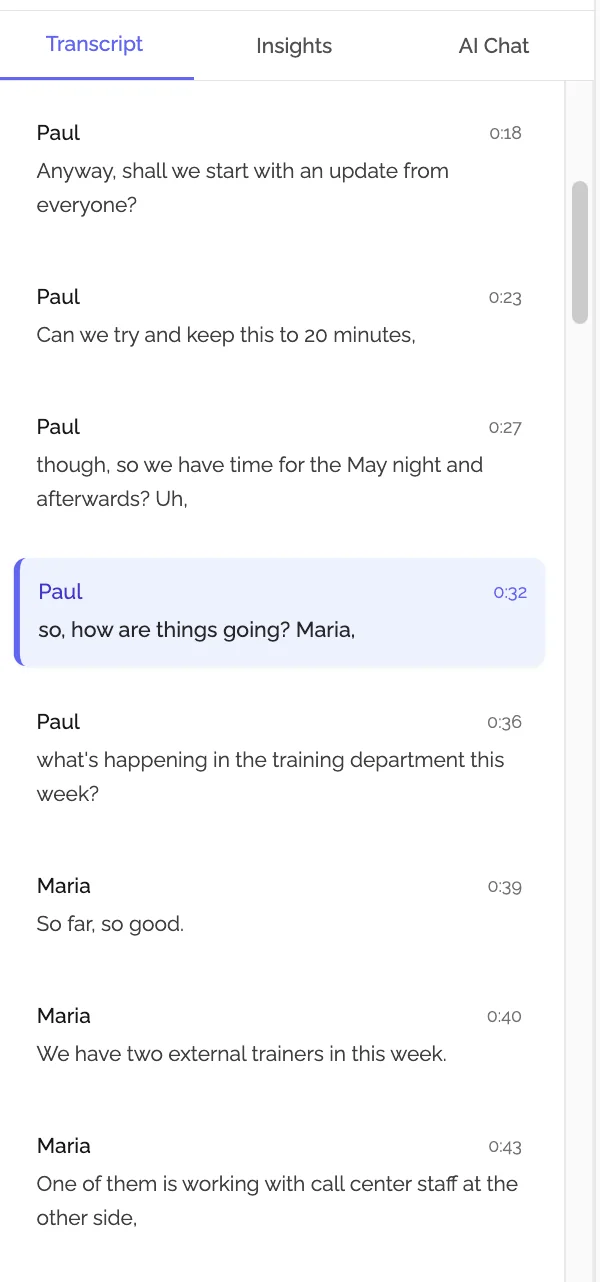 Full transcript with speaker identification from an uploaded in-person meeting recording.
2. Otter.ai - Mobile App Recording with AI Transcription
The honest summary: Otter.ai has a mobile app that can record in-person meetings directly and transcribe them in real time. This makes it one of the few mainstream AI meeting tools with a genuine in-person workflow built in. The free tier allows 300 minutes of transcription per month, which covers roughly five one-hour meetings.
How it works for in-person meetings:
- Open the Otter app on your phone and tap Record
- Otter transcribes in real time as people speak around you
- Review and edit the transcript after the meeting
- The recording is stored in your Otter account
Pricing: Free (300 min/month), Pro at $16.99/month (1,200 min/month)
Strengths for in-person use:
- Real-time transcription. You can watch the transcript appear live
- No file transfer needed (records directly in the app)
- Speaker identification works reasonably well for in-person audio
- Available on iOS and Android
Limitations:
- 300 minutes per month on free plan runs out faster than expected
- In-person transcription quality depends heavily on device placement and room acoustics
- Calendar integration is pushed during onboarding (though not required for manual recording)
- Subscription becomes expensive if you record inconsistently
Verdict: Otter is the most practical mainstream option for teams that want real-time in-person transcription on a mobile device, particularly for light-to-moderate recording volume. The 300-minute free cap limits how much you can use it without paying.
3. Notta - Strong Multilingual Transcription via Upload
The honest summary: Notta supports audio file uploads and provides transcription in 104 languages, making it a strong option for multilingual teams or international meetings. The free plan has a 3-minute upload cap per file, which effectively rules it out for recording full meetings. You need a paid plan for practical in-person use.
How it works for in-person meetings:
- Record on your phone or recorder
- Upload the audio file to Notta (paid plan required for files longer than 3 minutes)
- Receive transcription with speaker identification and basic AI summary
Pricing: Free (120 min/month, 3 min/file upload limit), Pro at $13.99/month (1,800 min/month)
Strengths for in-person use:
- Excellent multilingual support, the best on this list for non-English meetings
- Upload workflow works cleanly on paid plans
- Good transcription accuracy overall
Limitations:
- Free plan's 3-minute file upload limit is impractical for real meetings
- AI summary features less sophisticated than KenzNote or Otter
- Requires a paid plan to be genuinely useful for in-person recording
Verdict: Notta is worth considering if you regularly conduct meetings in multiple languages and need reliable transcription accuracy across languages. For English-only use, the cost-to-value ratio is not as strong as other options.
4. Whisper-Based Local Tools - Best for Privacy-Sensitive Organizations
The honest summary: OpenAI's Whisper model is open source and can be run locally on a computer, meaning your audio never leaves your own machine. Several apps and tools are built on top of Whisper for exactly this reason: complete offline processing with no data sent to external servers.
How it works for in-person meetings:
- Record the meeting on your phone or a recorder
- Transfer the file to your computer
- Run it through a Whisper-based app (examples: MacWhisper on Mac, Whisper Transcription on iOS, or command-line Whisper)
- Receive a local transcript
Pricing: MacWhisper has a free tier with the basic Whisper model. Paid versions ($29 one-time) unlock faster and more accurate models. Command-line Whisper is free.
Strengths for in-person use:
- Complete privacy, audio stays on your device
- No subscription, no per-meeting fee after initial purchase
- Works completely offline once the model is downloaded
- Transcription quality with the large Whisper model is excellent
Limitations:
- No AI summary or action item extraction (transcription only)
- Technical setup required for command-line use
- Processing takes longer than cloud-based tools (especially on older hardware)
- No speaker identification in most local implementations
Verdict: The right choice for organizations in regulated industries (healthcare, legal, finance, government) where sending audio to external servers creates compliance problems. You get strong transcription but will need to summarize and extract action items yourself.
5. Plaud Note - Hardware Recorder with Built-In AI
The honest summary: Plaud Note is a dedicated AI meeting recorder that clips to your phone (or sits on a table) and records meetings, then transcribes and summarizes through the Plaud app. It is designed specifically for in-person and phone call recording, making it one of the few hardware products built around this use case.
How it works:
- Clip the Plaud Note device to your phone or place it on the table
- The device records audio (up to 30 hours of battery life)
- After the meeting, sync to the Plaud app for AI transcription and summary
- Access your notes in the app
Pricing: Device costs $169. Transcription credits included with purchase. Ongoing plan starts at $8/month after the included credit runs out.
Strengths for in-person use:
- Purpose-built for in-person and phone recording
- Good audio capture hardware designed for the task
- Discrete form factor, does not look like you are propping a phone up
- Works without internet during recording (syncs afterward)
Limitations:
- Hardware cost upfront ($169 for the device alone)
- Ongoing subscription required for continued AI processing after included credits
- Transcription and summarization handled through Plaud's servers (not offline)
- Limited to scenarios where you can carry the device
Verdict: Plaud Note is a compelling option if you attend a high volume of in-person meetings and want a device built specifically for the task. The upfront hardware cost plus ongoing subscription makes it more expensive than software-only solutions for light users, but the recording quality advantage can justify it for daily use.
6. Zoom H1n (+ Cloud Transcription) - Best Audio Quality Option
The honest summary: The Zoom H1n is a portable audio recorder designed for journalists and field recording, not specifically for AI meeting notes. But for meetings where audio quality is critical (conference room roundtables, interviews, recorded presentations), its microphone quality surpasses any phone microphone significantly. Pair it with an upload-based transcription service like KenzNote for a high-quality end-to-end workflow.
Pricing: Device approximately $120 one-time. Transcription cost depends on your chosen upload service.
Strengths for in-person use:
- Dramatically better audio quality than phone microphones
- XY stereo microphone configuration captures room audio well
- Long battery life (around 10 hours)
- Outputs WAV files suitable for any transcription service
Limitations:
- No AI built in. You need a separate transcription service
- Additional device to carry and manage
- WAV files can be large (easier to work with compressed formats for upload)
Verdict: Best for use cases where audio quality is paramount and you are already pairing it with an upload-based AI tool. Not a standalone solution.
Tool Comparison Table
| Tool | Recording Method | AI Summary | Price | Privacy | Best For |
|---|---|---|---|---|---|
| KenzNote | Upload audio/video file | Yes | $0.99/meeting | No calendar required | Most in-person users |
| Otter.ai | Mobile app (live) or upload | Yes | Free (300 min/mo) / $16.99/mo | Calendar optional | Real-time in-person transcription |
| Notta | Upload file | Basic | $13.99/mo | Calendar optional | Multilingual meetings |
| Whisper (local) | Upload file (processed locally) | No | Free-$29 one-time | Full offline privacy | Regulated industries |
| Plaud Note | Dedicated hardware recorder | Yes | $169 device + $8/mo | Cloud processing | High-volume field meetings |
| Zoom H1n + KenzNote | Dedicated recorder + upload | Yes (via KenzNote) | ~$120 + $0.99/meeting | No calendar required | Best audio quality |
Device Options for Recording In-Person Meetings
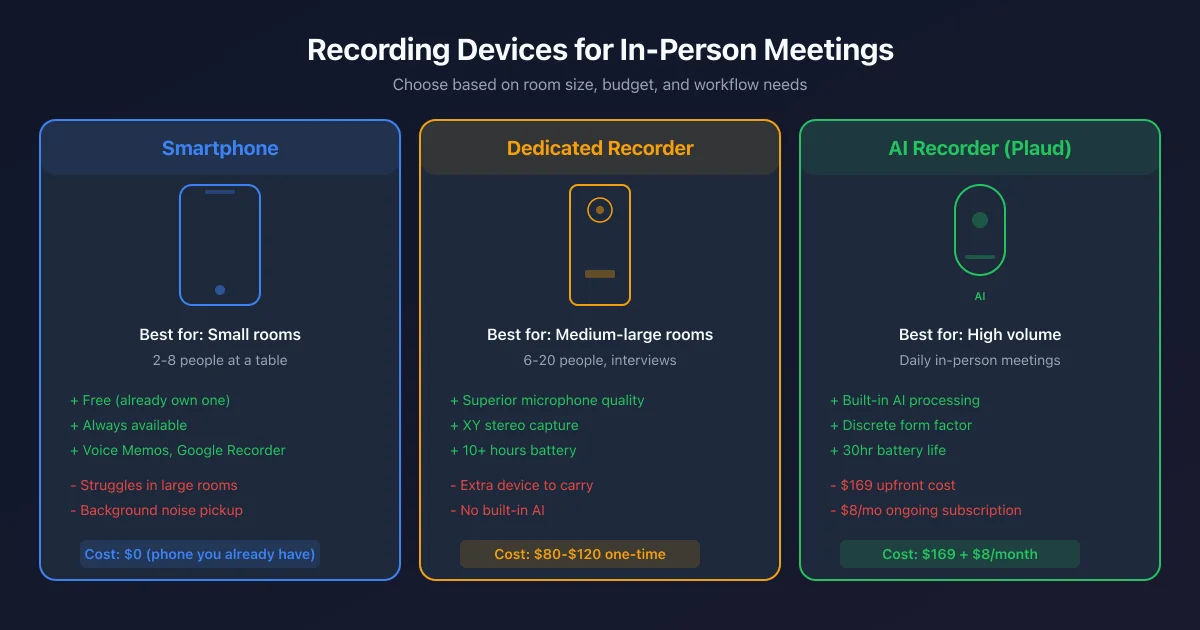 Recording device options for in-person meetings: smartphone, dedicated recorder, or AI-integrated hardware.
Smartphone Recording
Your phone is the most practical recording device for most situations. Modern smartphones have capable microphones and unlimited storage. Use the native Voice Memos app (iPhone) or Google Recorder (Android), or a dedicated app like Otter, Rev Voice Recorder, or Hi-Q MP3 Recorder for more control over audio quality.
Best practices:
- Place the phone face-up in the center of the table, not at one end
- Enable airplane mode during recording to prevent notification sounds interrupting the audio
- Choose a compressed format (M4A or MP3 at 128 kbps) for faster upload, or uncompressed for maximum quality
- Test your device placement before the meeting starts by recording 30 seconds of conversation
Where phones fall short: In large conference rooms or outdoor settings, phone microphones struggle to capture voices at a distance clearly. For rooms larger than a typical meeting room (8-10 people at a standard table), audio quality degrades meaningfully.
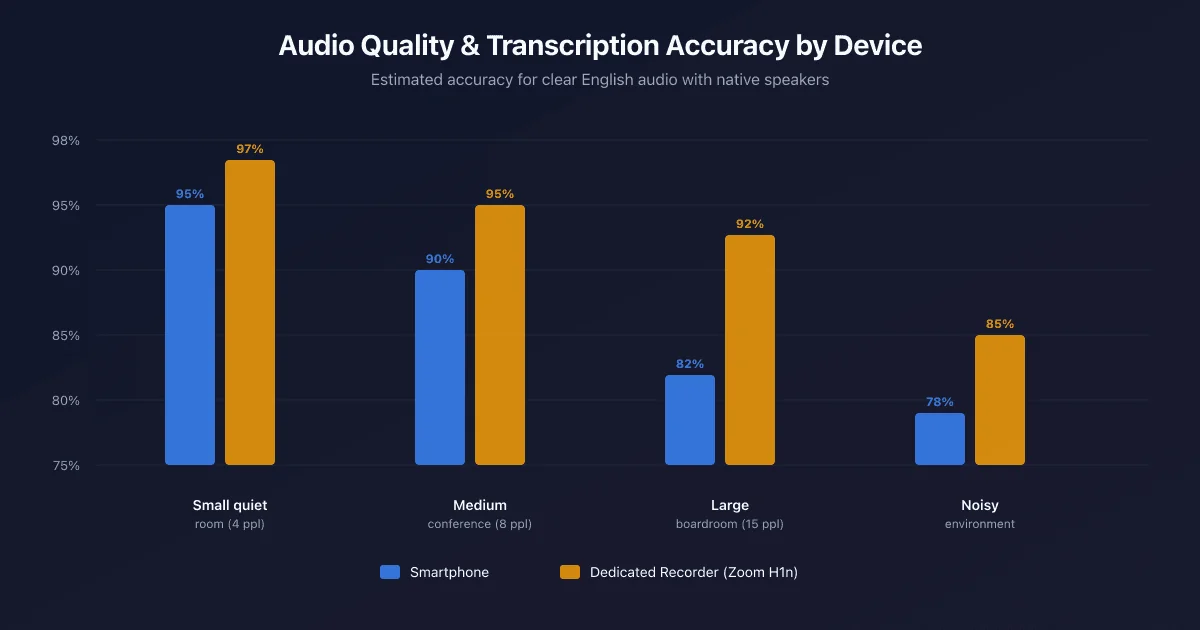 Smartphone microphones work well in small rooms but dedicated recorders outperform them in larger spaces.
Dedicated Voice Recorders
Devices like the Zoom H1n ($120), Sony ICD-UX570 ($80), or Olympus LS-P4 ($120) deliver better audio quality than smartphones in most meeting environments. They have more sensitive directional microphones, less background noise pickup, and longer battery life.
When to use a dedicated recorder:
- Large conference rooms where a phone microphone would struggle to capture distant speakers
- Situations where you need to be discrete about recording (smaller, less obvious than propping up a phone)
- Interviews or research recordings where transcription accuracy directly affects your work product
- When you need many hours of recording without managing phone battery or storage
Plaud Note and Dedicated AI Recorders
The new category of AI-integrated recorders, Plaud Note being the leading example, handles both the hardware recording and the AI processing in one device-and-app pairing. They are optimized specifically for meeting transcription, with microphone arrays tuned for capturing voices in a room.
The trade-off is cost and lock-in: you are paying for hardware plus an ongoing subscription, and your audio is processed by the device manufacturer's servers. For users with high recording volume and a willingness to invest in the hardware, they simplify the workflow considerably.
Tips for Best In-Person Recording Quality
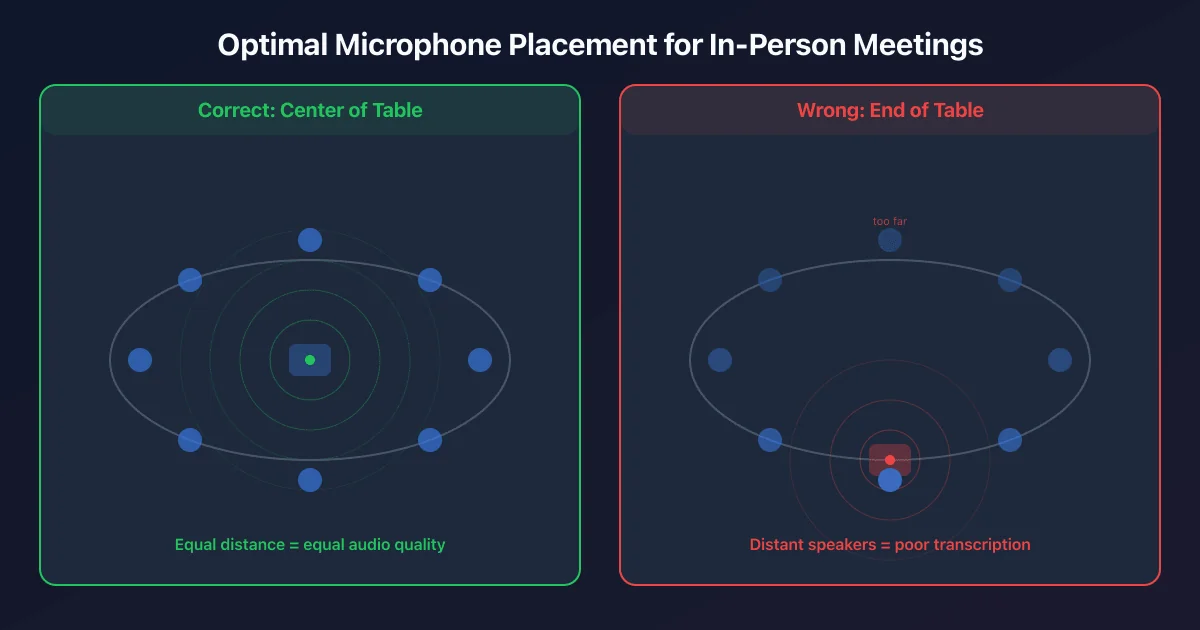 Place your recording device at the center of the table for the best audio capture across all speakers.
The quality of your transcript depends heavily on the quality of your audio. These practices make a meaningful difference:
Place the microphone centrally. Put your recording device at the center of the table or equidistant from the people who will be speaking most. A microphone at one end of a long table will capture the nearby speakers clearly and distant speakers poorly, which means those voices will be transcribed inaccurately or missed entirely.
Reduce background noise before recording. Close doors to hallways, turn off fans and HVAC if you can, and silence any devices that might generate notification sounds. Air conditioning is a particular problem in office conference rooms. It creates a constant white noise floor that degrades transcription accuracy.
Use a quiet room. Open-plan offices, coffee shops, and outdoor settings are challenging for transcription. A closed conference room with sound-absorbing materials (carpet, ceiling tiles, upholstered chairs) produces significantly better audio than a glass-walled room or an open floor.
Ask participants to speak clearly and avoid talking over each other. Crosstalk (two people speaking simultaneously) is one of the biggest sources of transcription errors. In a relaxed meeting, remind participants that the recording benefits from one voice at a time. Most people are accommodating when they understand why.
Test your setup first. Record 60 seconds at the start of the meeting, then play it back on headphones. If the audio sounds clear to you, it will transcribe well. If you can hear significant room echo or the voices sound distant, adjust placement before continuing.
Identify speakers verbally at the start. If your transcription tool supports speaker identification, help it along by having participants say their name once at the beginning: "I'm Sarah, and I'll be presenting the Q2 results." This gives the AI a reference point for attributing speech throughout the recording.
Frequently Asked Questions
Can AI transcription tools work without an internet connection?
During the recording itself, no internet is required. You are just capturing audio. For AI processing, almost all cloud-based tools require an internet connection to upload the file and generate transcription. The exception is local tools built on Whisper or similar models that run entirely on your device. These process audio offline but require significant computing resources and lack AI summary features.
Is it legal to record in-person meetings?
Recording consent laws vary significantly by location. In the United States, federal law requires one-party consent (meaning the person recording can consent on their own behalf), but many states require all-party consent, including California, Illinois, Florida, and others. In all-party consent jurisdictions, you need to inform all participants that the meeting is being recorded before you begin. Outside the US, laws vary further. When in doubt, disclose the recording at the start of the meeting. Most participants are fine with it when asked directly.
How accurate is AI transcription for in-person meetings compared to video calls?
Accuracy depends primarily on audio quality, not the meeting format. A clean in-person recording made with a phone in the center of a quiet conference room will transcribe as accurately as a clear video call. The challenge with in-person meetings is environmental: background noise, overlapping voices, and microphone distance all reduce accuracy. Modern AI transcription (including the models used by KenzNote and Otter) typically achieves 90-95% accuracy for clear audio with native English speakers, dropping to 85-90% in noisier environments.
What is the best way to record an in-person meeting on an iPhone?
The simplest approach is the built-in Voice Memos app, which captures high-quality audio and saves files in M4A format. For a one-hour meeting, expect a file size of roughly 60-90 MB. Place the phone face-up in the center of the table, enable Do Not Disturb mode before recording to prevent interruptions, and let Voice Memos run. After the meeting, share the file from Voice Memos directly to your transcription tool of choice.
Can KenzNote process in-person meeting recordings?
Yes. KenzNote is built around file upload rather than bot-based recording, which makes it well-suited for in-person meetings. Record your meeting on your phone or any recording device, upload the audio or video file to KenzNote, and receive a full transcript and AI-generated meeting summary. There is no requirement to connect a calendar, no bot to configure, and no subscription required. You pay $0.99 for each meeting you process.
What is the difference between a hardware AI recorder like Plaud Note and using a phone?
The primary differences are audio quality and workflow integration. Plaud Note uses hardware optimized specifically for voice capture in meeting environments, which can result in better audio, particularly for larger rooms or meetings with more participants. It also integrates directly with an AI processing app, removing the manual step of transferring files. The trade-off is the upfront device cost ($169) plus ongoing subscription fees. For most users with access to a quiet room and a modern smartphone, the quality difference is modest and the convenience gap is manageable with an upload-based tool like KenzNote. For users who record multiple in-person meetings daily or work in variable acoustic environments, the hardware investment may be worthwhile.
Related Resources
- Bot-Free AI Meeting Recorder: Why It Matters
- Best Free AI Meeting Notetaker 2026
- Best AI Meeting Note Taker Apps 2026
- Best AI Transcription Services 2026
- Is It Legal to Record Meetings? State-by-State Guide
- Automatic Meeting Notes: Complete Guide
Ready to Transcribe Your In-Person Meetings?
Stop losing valuable conversation from conference rooms, client visits, and workshops just because there is no Zoom link.
Start with KenzNote:
- $0.99 per meeting (or $29.99/month unlimited)
- No bot, no calendar access required
- Upload any audio or video file
- Full transcripts, AI summaries, and action items
- Works with any recording device or app
Questions? Email [email protected]
Last updated: April 2026. Pricing and product features change. Verify current details on each tool's official site before purchasing.
References & Citations
- [1]Gartner HR Survey Finds 65% of Employees are Excited to use AI at WorkGartner. December 16, 2025https://www.gartner.com/en/newsroom/press-releases/2025-12-16-gartner-hr-survey-finds-65-percent-of-employees-are-excited-to-use-ai-at-work
All external sources have been reviewed for accuracy and relevance. Last verified: October 2026.

About KenzNote Team
The KenzNote team is dedicated to helping teams capture better meeting insights and transform how they collaborate. With backgrounds in AI, product design, and enterprise software, we're building the future of meeting productivity.
Ready to transform your meetings?
KenzNote automatically captures meeting insights, extracts action items, and generates summaries so you can focus on the conversation instead of taking notes.
Try KenzNote Free