
Quick Answer
The fastest way to send a follow-up email after a meeting: record the meeting with an AI tool, let it generate a summary and action items, then paste those into an email and send. The whole process takes under two minutes.
If you are still writing follow-ups from memory, you are doing twice the work and missing half the details.
KenzNote does this for $0.99 per meeting with no subscription: record your call, get a structured summary with action items, copy it into an email, and send. No calendar access required.
Key Takeaways
- Only 15% of professionals consistently follow up after meetings, and teams that do complete action items at 2.5x the rate of those that don't
- Manual follow-ups take 15-25 minutes per meeting and require recalling details from memory, which is error-prone and often skipped entirely
- AI-powered follow-ups take under 5 minutes because the AI generates the summary, decisions, and action items automatically from the recording
- 4 ready-to-use email templates included for client meetings, team standups, sales calls, and 1:1s
- KenzNote outputs are already formatted for email so you can copy-paste the summary directly with minimal editing
- Send within 2 hours for maximum impact, and lead with action items rather than burying them after the summary
Table of Contents
- Why Meeting Follow-Up Emails Actually Matter
- The Manual Follow-Up Problem
- How AI Automates the Entire Follow-Up Workflow
- Step-by-Step: How to Send AI-Generated Follow-Up Emails
- 4 Ready-to-Use Meeting Follow-Up Email Templates
- Best AI Tools for Automated Meeting Follow-Ups
- Tips for Writing Better AI-Assisted Follow-Up Emails
- Frequently Asked Questions
- Related Resources
You searched "AI follow up email after meeting" because you just sat through a 45-minute call and now you are staring at a blank email trying to remember what was actually decided. You know the follow-up matters. You also know it is going to take 20 minutes to write, and you have another call in 10.
Most people solve this problem by not sending the follow-up at all. That is how decisions get forgotten, action items slip, and the same topics get rehashed in the next meeting.
AI meeting tools fix this entirely. Record the meeting, get a structured summary with action items, paste it into a template, and send. This guide shows you exactly how, with four ready-to-use templates and a comparison of the tools that do it best.
Why Meeting Follow-Up Emails Actually Matter
Most meetings do not fail during the meeting. They fail in the hour after, when nobody sends a recap, action items get forgotten, and decisions quietly disappear.
The data backs this up. Research from Harvard Business Review found that only 15% of professionals consistently follow up after meetings. Teams that do send structured follow-ups complete action items at 2.5x the rate of teams that rely on memory and informal conversations.
A well-written follow-up email does three things:
- Creates a written record of what was decided
- Assigns ownership to each action item so nothing slips through
- Keeps everyone aligned, especially people who could not attend
The problem is that writing a thorough follow-up takes time. After a 45-minute call, nobody wants to spend another 20 minutes reconstructing decisions and reformatting notes into a readable email. So most people do not bother. Or they send a vague three-liner that leaves more questions than it answers.
That is where AI changes the equation entirely.
The Manual Follow-Up Problem
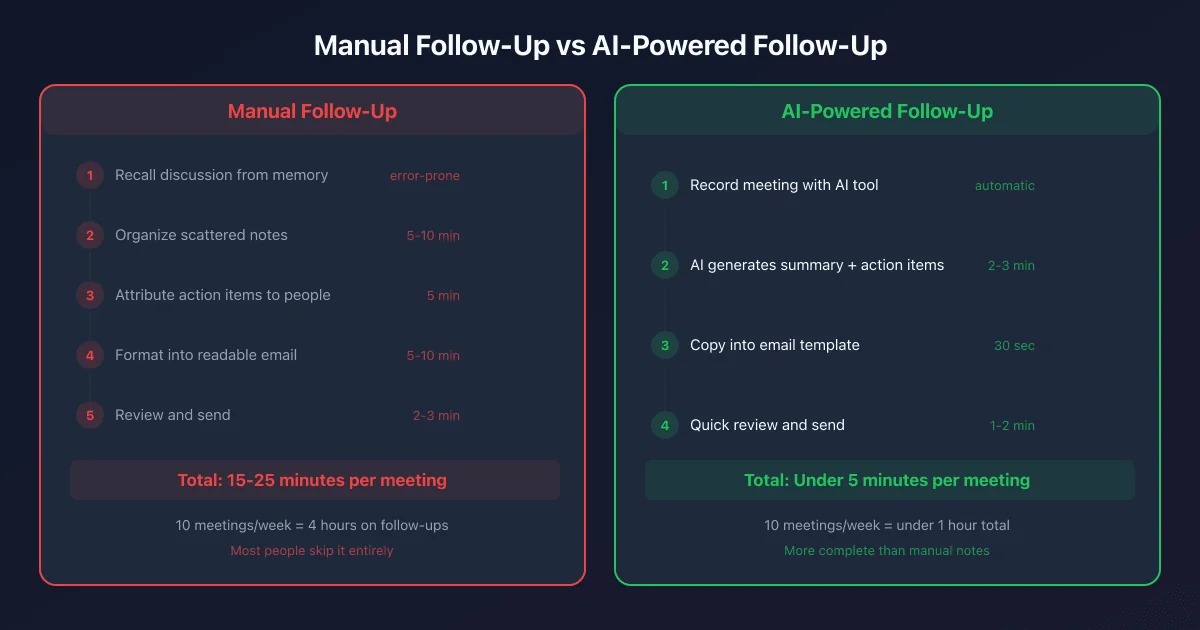 Manual follow-ups take 15-25 minutes per meeting. AI reduces that to under 5 minutes with better accuracy.
Writing a follow-up email manually requires you to:
- Recall everything discussed while your memory is already fading
- Organize scattered notes into a readable format
- Attribute action items to the right people with the right deadlines
- Match the right tone for the audience (client vs. internal team vs. executive)
- Send it quickly enough to be useful
Even for good note-takers, this process takes 15 to 25 minutes per meeting. If you attend 10 meetings a week, that is up to four hours spent writing recap emails, time that adds zero strategic value.
The result is usually one of three outcomes: the follow-up never gets sent, it gets sent late with gaps, or it gets sent fast but it is incomplete and creates confusion.
How AI Automates the Entire Follow-Up Workflow
Modern AI meeting tools eliminate the manual step entirely. Instead of reconstructing the conversation from memory, the AI listens during the meeting, transcribes everything, and then extracts the structure you need: summary, key decisions, action items, and next steps.
You get a clean, organized output within minutes of the meeting ending. From there, turning it into a follow-up email is just a matter of copy, light editing, and send.
Here is exactly how the workflow looks in practice.
Step-by-Step: How to Send AI-Generated Follow-Up Emails
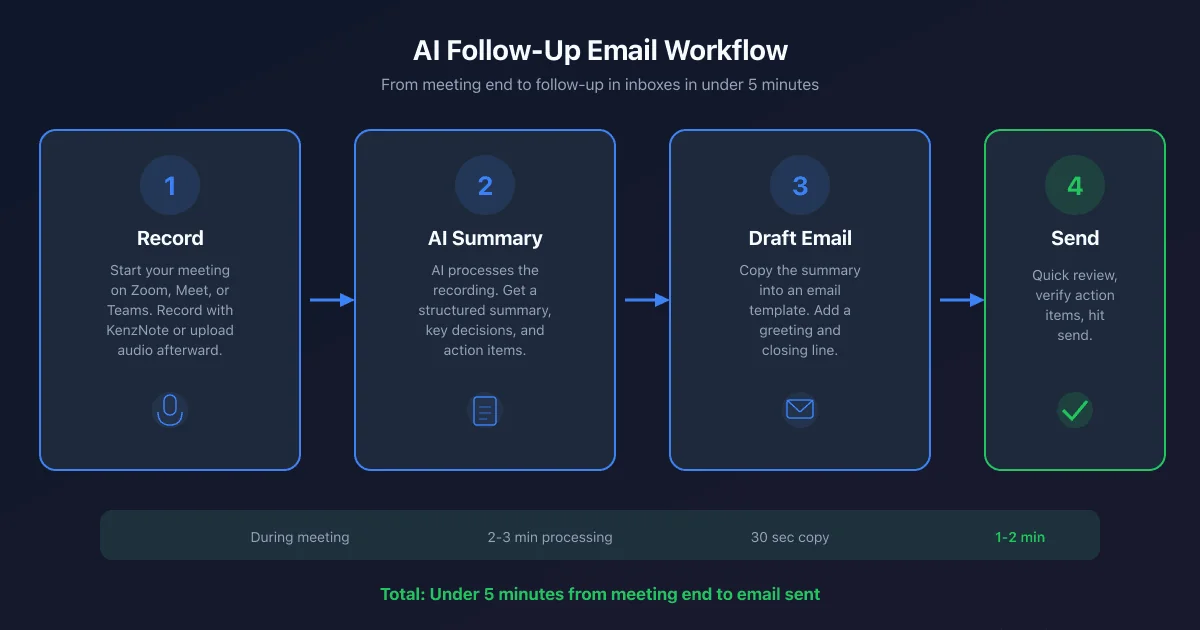 The complete AI follow-up workflow: from meeting end to email sent in under 5 minutes.
Step 1: Record Your Meeting
Start your meeting as usual on Zoom, Google Meet, or Microsoft Teams. Launch your AI meeting tool before or at the start of the call. With KenzNote, there is no need to connect your calendar or install a bot. You record the meeting directly, either by uploading the audio file or having KenzNote join the session. No calendar access required, no permissions to set up in advance.
Step 2: Get Your AI Summary
When the meeting ends, the AI processes the recording and produces a structured summary. This typically includes:
- A paragraph-level summary of what was discussed
- Key decisions made during the call
- Action items with the person responsible and (if mentioned) a deadline
- Any open questions that need resolution
With KenzNote, this summary is ready within a few minutes of the meeting ending. The output is clean and formatted, not a raw transcript dump, but an organized recap you can actually read.
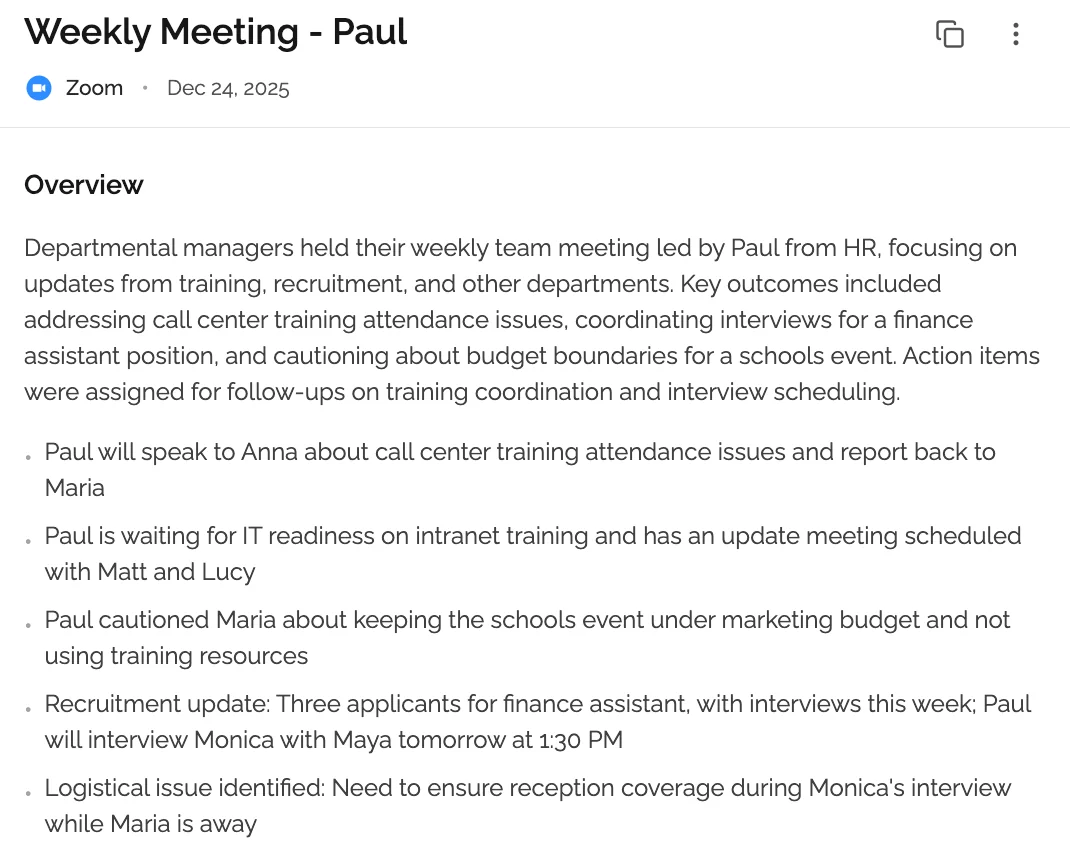 KenzNote generates a structured summary with action items ready to paste into a follow-up email.
Step 3: Generate the Follow-Up Email
Take the AI summary and turn it into an email. You have two options:
Option A: Direct copy-and-paste. Most AI summaries are already structured in a way that works as a follow-up email body. Add a greeting, a one-line intro ("Here is a recap of today's call"), and a closing line. Done.
Option B: Use an AI writing assistant. Paste the summary into ChatGPT or Claude and prompt it: "Turn this meeting summary into a concise follow-up email for a client." The result will be polished prose you can send immediately.
KenzNote outputs summaries that are already formatted for readability, making Option A the faster default for most meetings.
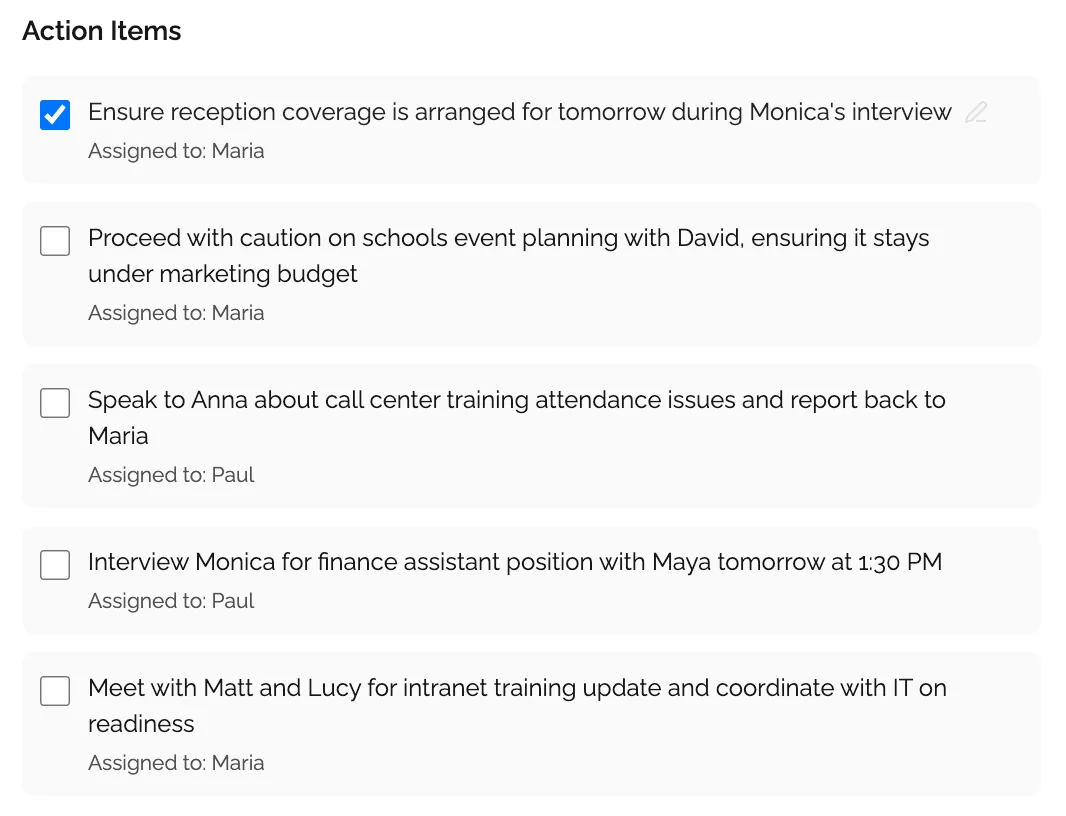 Action items are extracted automatically and ready to copy into your follow-up email.
Step 4: Review and Send
Scan the email before hitting send. Check that:
- Action items are assigned to the right people
- Deadlines are correct
- The tone matches your relationship with the recipient
- Nothing sensitive needs to be removed or rephrased
Edit what you need to, then send. The entire review-and-send process typically takes two to three minutes.
4 Ready-to-Use Meeting Follow-Up Email Templates
Use these templates directly, filling in the bracketed placeholders with your AI-generated content.
Template 1: Client Meeting Follow-Up
Subject: Recap from our meeting, [Date]
Hi [Name],
Thanks for taking the time to connect today. Here is a summary of what we covered and the next steps we agreed on.
Meeting Summary [Insert 2-3 sentence summary from your AI tool]
Key Decisions
- [Decision 1]
- [Decision 2]
Action Items
| Action | Owner | Due Date |
|---|---|---|
| [Task 1] | [Name] | [Date] |
| [Task 2] | [Name] | [Date] |
| [Task 3] | [Name] | [Date] |
Next Steps Our next meeting is scheduled for [date/time]. Please reach out if anything needs clarification before then.
Best, [Your Name]
Template 2: Internal Team Standup Recap
Subject: Standup recap, [Date]
Hi team,
Quick recap from today's standup:
Status Updates
- [Team member 1]: [What they shared]
- [Team member 2]: [What they shared]
- [Team member 3]: [What they shared]
Blockers
- [Blocker 1], [Owner] is working on resolution
- [Blocker 2], needs input from [Name] by [date]
Today's Priorities
- [Priority 1]
- [Priority 2]
- [Priority 3]
Full notes from today: [link or attach AI summary]
Template 3: Sales Call Follow-Up
Subject: Great talking with you, next steps inside
Hi [Prospect Name],
Thanks for the time today. It was great learning more about [their challenge or goal]. I wanted to follow up with a quick summary and what we discussed as potential next steps.
What We Covered [Insert 2-3 sentence summary from your AI tool]
How [Your Product/Service] Can Help [Insert the relevant points from the call]
Agreed Next Steps
| Action | Owner | Timing |
|---|---|---|
| [Task 1, e.g. Send proposal] | [Your name] | [Date] |
| [Task 2, e.g. Share case study] | [Your name] | [Date] |
| [Task 3, e.g. Internal review] | [Prospect name] | [Date] |
I will follow up on [specific date]. In the meantime, feel free to reply here with any questions.
Looking forward to moving this forward, [Your Name]
Template 4: 1:1 Meeting Follow-Up
Subject: Notes from our 1:1, [Date]
Hi [Manager/Report Name],
Here are the key points from today's 1:1:
Topics Discussed
- [Topic 1]
- [Topic 2]
- [Topic 3]
Decisions / Feedback [Insert key feedback or decisions from your AI summary]
Action Items
| Action | Owner | Due |
|---|---|---|
| [Task 1] | [Name] | [Date] |
| [Task 2] | [Name] | [Date] |
For Next 1:1
- [Agenda item to carry forward]
Let me know if I missed anything or if you want to adjust any of the action items.
Thanks, [Your Name]
Best AI Tools for Automated Meeting Follow-Ups
Several tools can generate the meeting summaries that power this workflow. Here is how they compare:
KenzNote. Pay-per-use at $0.99 per meeting with no subscription required. Works with Zoom, Google Meet, and Microsoft Teams. No calendar access needed, which makes it the most privacy-friendly option. The output is a structured summary with action items that translates directly into a follow-up email with minimal editing. Best for professionals who have variable meeting volume and do not want a monthly subscription.
Fireflies.ai. Subscription-based, with a free tier that caps storage and transcript length. Strong CRM integrations (Salesforce, HubSpot) that make it useful for sales teams who want follow-up notes pushed directly into their pipeline.
Otter.ai. One of the most established AI transcription tools, offering 300 minutes free per month. Good for note-taking but requires more manual work to format the output into a follow-up email.
Fathom. Free for Zoom meetings with no recording limits. The summaries are high quality and genuinely useful as follow-up content. The limitation is Zoom-only, which rules it out for Teams or Meet-heavy organizations.
For most individual professionals and small teams, KenzNote's pay-per-use model eliminates the cost concern entirely. You pay only for the meetings where you actually need a summary, and the output is ready to send.
Tips for Writing Better AI-Assisted Follow-Up Emails
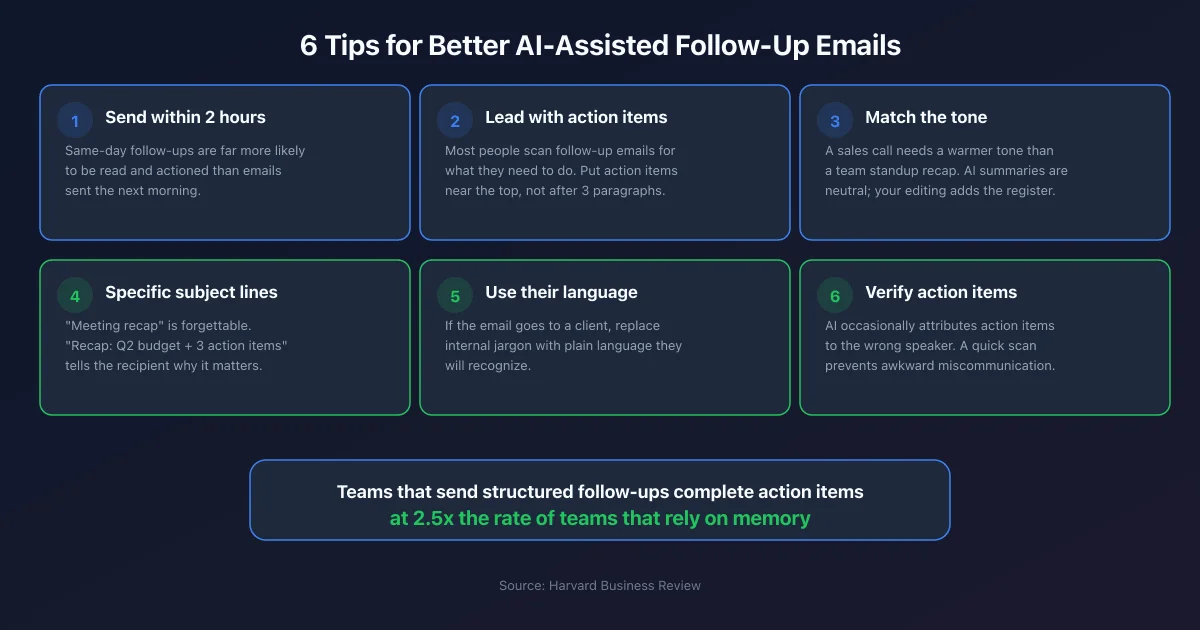 Six practices that make the difference between a follow-up that gets read and one that gets ignored.
Even when AI handles the heavy lifting, small editing choices make a significant difference in how the email lands.
Send within two hours. The sooner the email arrives, the more relevant it is. Same-day follow-ups are far more likely to be read and actioned than emails sent the next morning.
Lead with the action items, not the summary. Most people scan follow-up emails looking for what they need to do. Put the action item table near the top, not buried after three paragraphs of recap.
Match the tone to the relationship. A sales call follow-up to a new prospect needs a warmer, more formal tone than an internal team standup recap. AI summaries are neutral by default. Your editing should add the right register.
Keep subject lines specific. "Meeting recap" is forgettable. "Recap: Q2 budget decisions + 3 action items" tells the recipient exactly what is inside and why it matters.
Use the recipient's language. If the AI summary uses your internal terminology and the email is going to a client, replace jargon with plain language they will recognize.
Always verify action item ownership. AI tools are very good at identifying action items but occasionally attribute them to the wrong speaker. A quick scan before sending prevents awkward miscommunication.
Frequently Asked Questions
What is an AI follow-up email after a meeting?
An AI follow-up email is a meeting recap email generated (fully or partially) by an AI tool. Instead of writing the email from memory, you use an AI meeting tool to transcribe the meeting and extract the key points, summary, decisions, and action items, then turn that output into an email. The result is more complete and consistent than a manually written follow-up, and it takes a fraction of the time.
How accurate are AI-generated meeting summaries?
Accuracy depends on audio quality and the tool. With a good microphone and a clear call, modern AI meeting tools are typically 90-95% accurate on transcription, and the summarization is reliable enough for a follow-up email without major corrections. Background noise, heavy accents, or multiple speakers talking at once can reduce accuracy. Always do a quick review before sending.
Do I need to tell people the follow-up email was AI-generated?
There is no legal requirement to disclose it, but transparency is generally good practice, especially with clients. If you are using an AI tool to record and transcribe the meeting, most platforms (and good professional practice) call for informing participants before the meeting starts. The follow-up email itself is your communication, even if AI helped draft it.
Can I use AI follow-up emails for sales calls?
Yes, and this is one of the highest-value use cases. A well-structured follow-up email after a sales call summarizing pain points, proposed solutions, and agreed next steps significantly increases the likelihood of advancing the deal. AI-generated summaries ensure nothing from the conversation gets lost, which is especially important in complex sales cycles.
Does KenzNote require calendar access to record meetings?
No. Unlike most AI meeting tools, KenzNote does not require you to connect your Google Calendar or Outlook. You can record meetings directly without giving the tool access to your calendar, which makes it a strong choice for privacy-conscious professionals.
How much does it cost to automate meeting follow-ups with AI?
It depends on the tool. Fathom is free for Zoom users. Otter.ai offers 300 minutes per month free. KenzNote charges $0.99 per meeting with no subscription, making it cost-effective for professionals who attend 5 to 15 meetings per week and want to pay only for what they use without committing to a monthly plan.
Related Resources
- Best AI Meeting Note Taker Apps 2026
- Best Free AI Meeting Notetaker 2026
- Bot-Free AI Meeting Recorder: Why It Matters
- How to Create a Meeting Notes Template
- How to Organize Meeting Notes
- Automatic Meeting Notes: Complete Guide
Ready to Automate Your Meeting Follow-Ups?
Stop spending 20 minutes reconstructing meetings from memory. Let AI handle the summary so you can send the follow-up before your next call starts.
Start with KenzNote:
- $0.99 per meeting (or $29.99/month unlimited)
- No calendar access required
- AI summary + action items ready in minutes
- Copy-paste directly into your follow-up email
- Works with Zoom, Google Meet, and Microsoft Teams
Questions? Email [email protected]
References & Citations
- [1]Workplace Woes: MeetingsAtlassian. January 15, 2024https://www.atlassian.com/time-wasting-at-work-infographic
All external sources have been reviewed for accuracy and relevance. Last verified: October 2026.

About KenzNote Team
The KenzNote team is dedicated to helping teams capture better meeting insights and transform how they collaborate. With backgrounds in AI, product design, and enterprise software, we're building the future of meeting productivity.
Ready to transform your meetings?
KenzNote automatically captures meeting insights, extracts action items, and generates summaries so you can focus on the conversation instead of taking notes.
Try KenzNote Free